> ## Documentation Index
> Fetch the complete documentation index at: https://next.gentrace.ai/docs/llms.txt
> Use this file to discover all available pages before exploring further.
# Derivations
> Columns for extracting data, monitoring errors, and more.
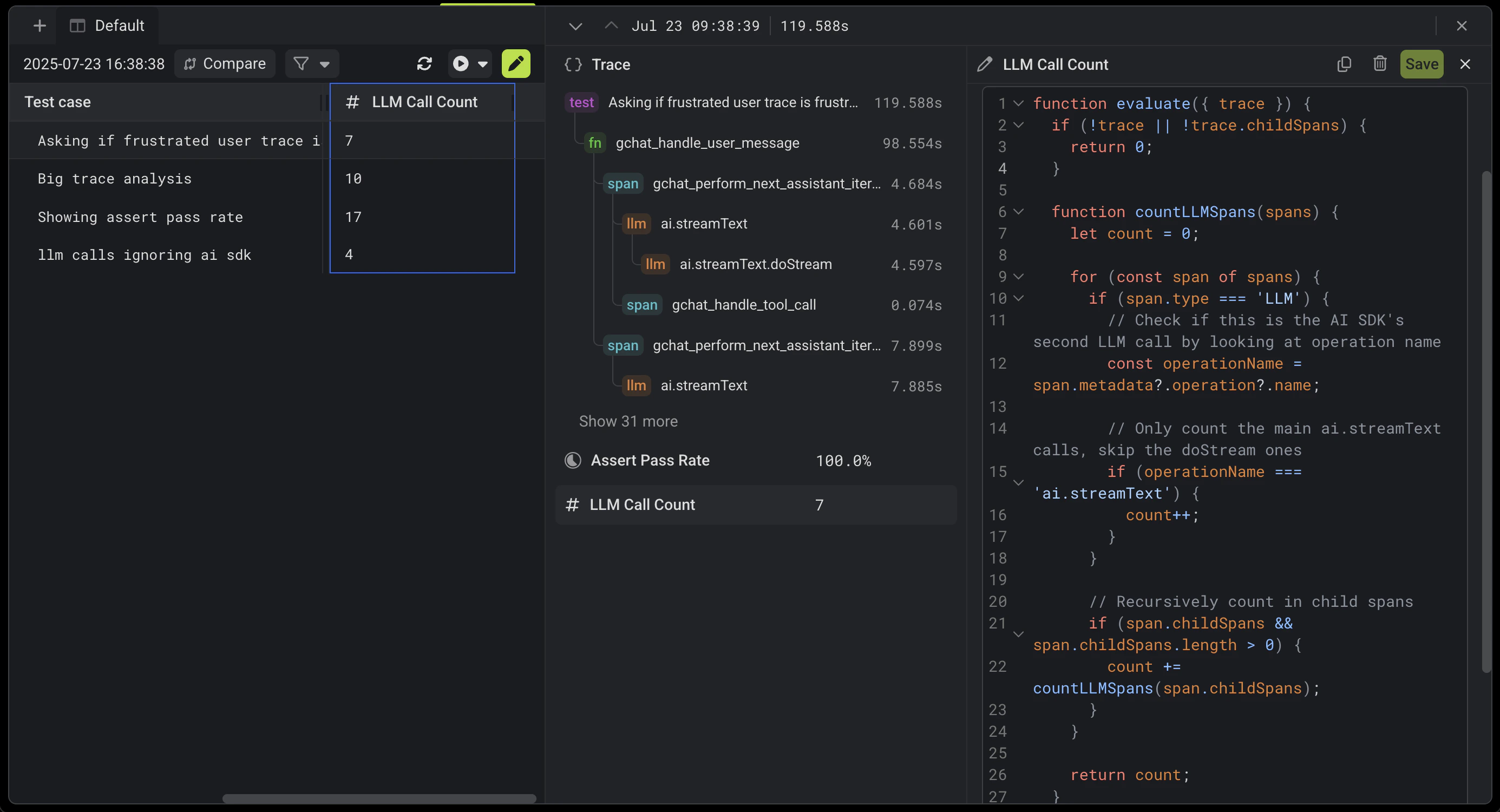
Derivations are snippets of code that run against [traces](/tracing/overview) and [experiments](/evaluation/experiments) to extract data, monitor for errors, and more.
Derivations can optionally run an agent to analyze the trace (a variant of LLM-as-judge that we call Agent-as-judge).
They show up as columns in the Gentrace UI.
 ## Structure of a derivation
### Language
Write derivations in Python or JavaScript.
### Return type
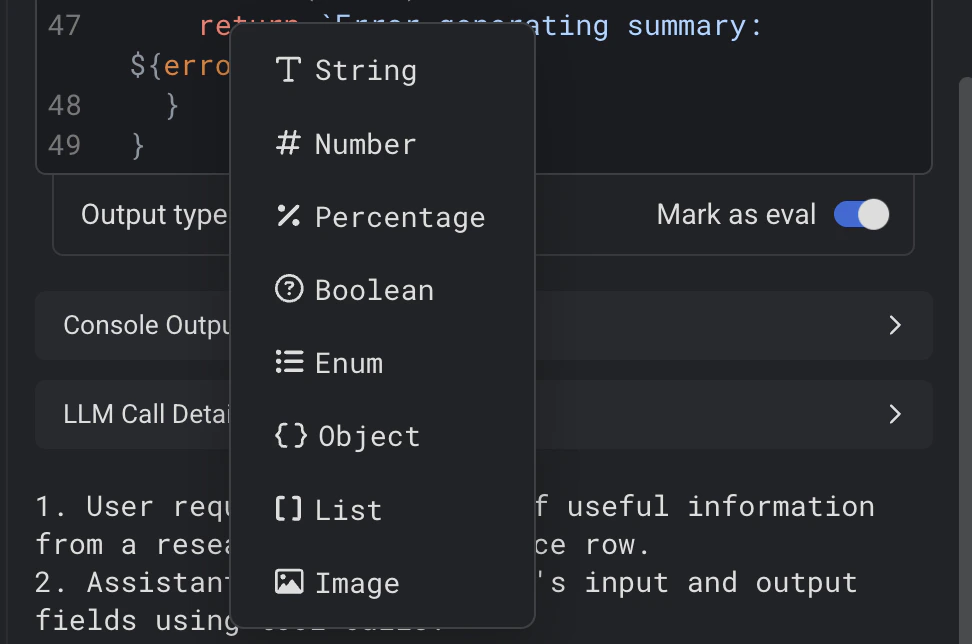
All derivations must return a typed value.
The type is specified in the dropdown at the bottom of the derivation and must match the return type of the function.
Some types can be marked as "eval". Eval derivations are averaged to compute a trace's score.
## Structure of a derivation
### Language
Write derivations in Python or JavaScript.
### Return type
All derivations must return a typed value.
The type is specified in the dropdown at the bottom of the derivation and must match the return type of the function.
Some types can be marked as "eval". Eval derivations are averaged to compute a trace's score.
 ### Function signature and arguments
Derivations are functions written in Python or JavaScript.
Derivations receive the following arguments:
* The trace
* (If available) The source test case from the test dataset
* All other derivations in the same [view](/error-analysis/views)
```javascript theme={null}
function evaluate({
// The trace data to analyze
trace,
// The source test case from the test dataset (if available)
testCase,
// All other derivations in the same view, spread as individual
// camelCase properties
...otherDerivations
}) {
...
// The return type must match the type specified in the
// dropdown at the bottom of the derivation.
return ...
}
```
```python theme={null}
def evaluate(params):
# The trace data to analyze
trace = params["trace"]
# The source test case from the test dataset (if available)
test_case = params["test_case"]
# All other derivations in the same view, spread as individual
# snake_case properties
some_other_derivation = params["some_other_derivation"]
...
# The return type must match the type specified in the
# dropdown at the bottom of the derivation.
return ...
```
### LLM-as-judge (Agent-as-judge)
Derivations can use an LLM to analyze traces with `callAgent()` / `call_agent()`.
The function accepts parameters for instructions, resources (like the trace), output schema, and optionally images.
```javascript theme={null}
const { count } = await callAgent({
instructions: "How many r's in strawberry?",
jsonSchema: {
type: 'object',
properties: {
count: { type: 'number' },
},
required: ['count'],
},
});
// Analyzing a user message
const { sentiment } = await callAgent({
instructions: 'Analyze the sentiment of: ' + userMessage,
jsonSchema: {
type: 'object',
properties: {
sentiment: {
type: 'string',
enum: ['positive', 'neutral', 'negative'],
},
confidence: {
type: 'number',
minimum: 0,
maximum: 1,
},
},
required: ['sentiment', 'confidence'],
},
});
// Analyzing a trace
const { longestMessage } = await callAgent({
instructions:
'Get the sentiment of the longest user message in this trace',
resources: [{ type: 'trace' }],
jsonSchema: {
type: 'object',
properties: {
sentiment: {
type: 'string',
enum: ['positive', 'neutral', 'negative'],
},
confidence: {
type: 'number',
minimum: 0,
maximum: 1,
},
longestMessage: { type: 'string' },
},
required: ['sentiment', 'confidence', 'longestMessage'],
},
});
```
```python theme={null}
result = await call_agent({
"instructions": "How many r's in strawberry?",
"json_schema": {
"type": "object",
"properties": {
"count": { "type": "number" }
},
"required": ["count"]
}
})
# Analyzing a user message
result = await call_agent({
"instructions": "Analyze the sentiment of: " + user_message,
"json_schema": {
"type": "object",
"properties": {
"sentiment": {
"type": "string",
"enum": ["positive", "neutral", "negative"]
},
"confidence": {
"type": "number",
"minimum": 0,
"maximum": 1
}
},
"required": ["sentiment", "confidence"]
}
})
# Analyzing a trace
result = await call_agent({
"instructions": "Get the sentiment of the longest user message in this trace",
"resources": [{"type": "trace"}],
"json_schema": {
"type": "object",
"properties": {
"sentiment": {
"type": "string",
"enum": ["positive", "neutral", "negative"]
},
"confidence": {
"type": "number",
"minimum": 0,
"maximum": 1
},
"longestMessage": {"type": "string"}
},
"required": ["sentiment", "confidence", "longestMessage"]
}
})
```
## Running derivations
Derivations run in the context of a [view](/error-analysis/views).
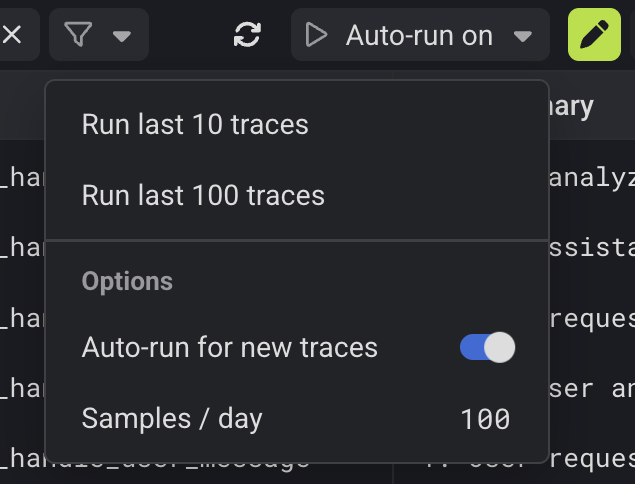
Derivations are run in three ways:
* Automatically by [Gentrace Chat](/error-analysis/chat)
* Automatically on trace ingest when sampled according to the view's [auto-run settings](/error-analysis/views#sampling-and-auto-run-traces-page-only)
* Manually, by:
* Pressing "Run last 10" or "Run last 100" in the top bar of the view
* Right clicking on a column header in the table
* Right clicking on a row or cell in the traces table
* Pressing "Run" with a derivation selected
### Function signature and arguments
Derivations are functions written in Python or JavaScript.
Derivations receive the following arguments:
* The trace
* (If available) The source test case from the test dataset
* All other derivations in the same [view](/error-analysis/views)
```javascript theme={null}
function evaluate({
// The trace data to analyze
trace,
// The source test case from the test dataset (if available)
testCase,
// All other derivations in the same view, spread as individual
// camelCase properties
...otherDerivations
}) {
...
// The return type must match the type specified in the
// dropdown at the bottom of the derivation.
return ...
}
```
```python theme={null}
def evaluate(params):
# The trace data to analyze
trace = params["trace"]
# The source test case from the test dataset (if available)
test_case = params["test_case"]
# All other derivations in the same view, spread as individual
# snake_case properties
some_other_derivation = params["some_other_derivation"]
...
# The return type must match the type specified in the
# dropdown at the bottom of the derivation.
return ...
```
### LLM-as-judge (Agent-as-judge)
Derivations can use an LLM to analyze traces with `callAgent()` / `call_agent()`.
The function accepts parameters for instructions, resources (like the trace), output schema, and optionally images.
```javascript theme={null}
const { count } = await callAgent({
instructions: "How many r's in strawberry?",
jsonSchema: {
type: 'object',
properties: {
count: { type: 'number' },
},
required: ['count'],
},
});
// Analyzing a user message
const { sentiment } = await callAgent({
instructions: 'Analyze the sentiment of: ' + userMessage,
jsonSchema: {
type: 'object',
properties: {
sentiment: {
type: 'string',
enum: ['positive', 'neutral', 'negative'],
},
confidence: {
type: 'number',
minimum: 0,
maximum: 1,
},
},
required: ['sentiment', 'confidence'],
},
});
// Analyzing a trace
const { longestMessage } = await callAgent({
instructions:
'Get the sentiment of the longest user message in this trace',
resources: [{ type: 'trace' }],
jsonSchema: {
type: 'object',
properties: {
sentiment: {
type: 'string',
enum: ['positive', 'neutral', 'negative'],
},
confidence: {
type: 'number',
minimum: 0,
maximum: 1,
},
longestMessage: { type: 'string' },
},
required: ['sentiment', 'confidence', 'longestMessage'],
},
});
```
```python theme={null}
result = await call_agent({
"instructions": "How many r's in strawberry?",
"json_schema": {
"type": "object",
"properties": {
"count": { "type": "number" }
},
"required": ["count"]
}
})
# Analyzing a user message
result = await call_agent({
"instructions": "Analyze the sentiment of: " + user_message,
"json_schema": {
"type": "object",
"properties": {
"sentiment": {
"type": "string",
"enum": ["positive", "neutral", "negative"]
},
"confidence": {
"type": "number",
"minimum": 0,
"maximum": 1
}
},
"required": ["sentiment", "confidence"]
}
})
# Analyzing a trace
result = await call_agent({
"instructions": "Get the sentiment of the longest user message in this trace",
"resources": [{"type": "trace"}],
"json_schema": {
"type": "object",
"properties": {
"sentiment": {
"type": "string",
"enum": ["positive", "neutral", "negative"]
},
"confidence": {
"type": "number",
"minimum": 0,
"maximum": 1
},
"longestMessage": {"type": "string"}
},
"required": ["sentiment", "confidence", "longestMessage"]
}
})
```
## Running derivations
Derivations run in the context of a [view](/error-analysis/views).
Derivations are run in three ways:
* Automatically by [Gentrace Chat](/error-analysis/chat)
* Automatically on trace ingest when sampled according to the view's [auto-run settings](/error-analysis/views#sampling-and-auto-run-traces-page-only)
* Manually, by:
* Pressing "Run last 10" or "Run last 100" in the top bar of the view
* Right clicking on a column header in the table
* Right clicking on a row or cell in the traces table
* Pressing "Run" with a derivation selected
 ## Example derivations
Use the prompts below in [Gentrace Chat](/error-analysis/chat) to analyze your traces.
### Understand agent execution
```text wrap theme={null}
Summarize the entire trace as a series of steps
```
```text wrap theme={null}
Extract the user message that triggered the agent
```
```text wrap theme={null}
Extract the final assistant message (if present)
```
```text wrap theme={null}
Show which tools were used, and how many times
```
### Understand user experience
```text wrap theme={null}
Extract the user's name and organization (if present in the trace)
```
```text wrap theme={null}
Rate the user's frustration level based on the trace
```
### Measure cost and performance
```text wrap theme={null}
Show the total number of LLM calls
```
```text wrap theme={null}
Show the number of input, output, and/or total tokens across the trace
```
```text wrap theme={null}
Show the total number of tool calls
```
### Monitor for errors
```text wrap theme={null}
Did the agent satisfy the user's request?
```
```text wrap theme={null}
Show the number of failed tool calls
```
```text wrap theme={null}
Show the number of failed LLM calls
```
### Write evaluations with LLM-as-judge
```text wrap theme={null}
Compare the factualness of the assistant's response to expected output
```
```text wrap theme={null}
Show the percentage of assertions that pass in the trace
```
## Example derivations
Use the prompts below in [Gentrace Chat](/error-analysis/chat) to analyze your traces.
### Understand agent execution
```text wrap theme={null}
Summarize the entire trace as a series of steps
```
```text wrap theme={null}
Extract the user message that triggered the agent
```
```text wrap theme={null}
Extract the final assistant message (if present)
```
```text wrap theme={null}
Show which tools were used, and how many times
```
### Understand user experience
```text wrap theme={null}
Extract the user's name and organization (if present in the trace)
```
```text wrap theme={null}
Rate the user's frustration level based on the trace
```
### Measure cost and performance
```text wrap theme={null}
Show the total number of LLM calls
```
```text wrap theme={null}
Show the number of input, output, and/or total tokens across the trace
```
```text wrap theme={null}
Show the total number of tool calls
```
### Monitor for errors
```text wrap theme={null}
Did the agent satisfy the user's request?
```
```text wrap theme={null}
Show the number of failed tool calls
```
```text wrap theme={null}
Show the number of failed LLM calls
```
### Write evaluations with LLM-as-judge
```text wrap theme={null}
Compare the factualness of the assistant's response to expected output
```
```text wrap theme={null}
Show the percentage of assertions that pass in the trace
```